


Creating HTML Reports
Nmap does not have an option for saving scan results in HTML,
however it is possible to convert XML output to HTML automatically. An
Nmap XML output file usually contains a reference to an
XSL
stylesheet called
nmap.xsl
that describes how the transformation takes place.
The XML processing instruction that says where the stylesheet can be found will look something like
<?xml-stylesheet href="/usr/share/nmap/nmap.xsl" type="text/xsl"?>
The exact location may be different depending on the platform and how Nmap was configured.
Such a stylesheet reference will work fine when viewing scan
results on the same machine that initiated the scan, but it will not
work if the XML file is transferred to another machine where the
nmap.xsl file is in a different place or absent
entirely. To make the XML styling portable, give the
--webxml
option to Nmap. This will change the processing instruction to read
<?xml-stylesheet href="https://nmap.org/svn/docs/nmap.xsl" type="text/xsl"?>
The resultant XML output file will render as HTML on any web-connected
machine. Using the network location in this fashion is often more
useful, but the local copy of nmap.xsl is used by
default for privacy reasons.
To use a different stylesheet, use the
--stylesheet
option. Note that <file>--webxml is an alias for
--stylesheet https://nmap.org/svn/docs/nmap.xsl.
To omit the stylesheet entirely, use the option
--no-stylesheet.
Saving a Permanent HTML Report
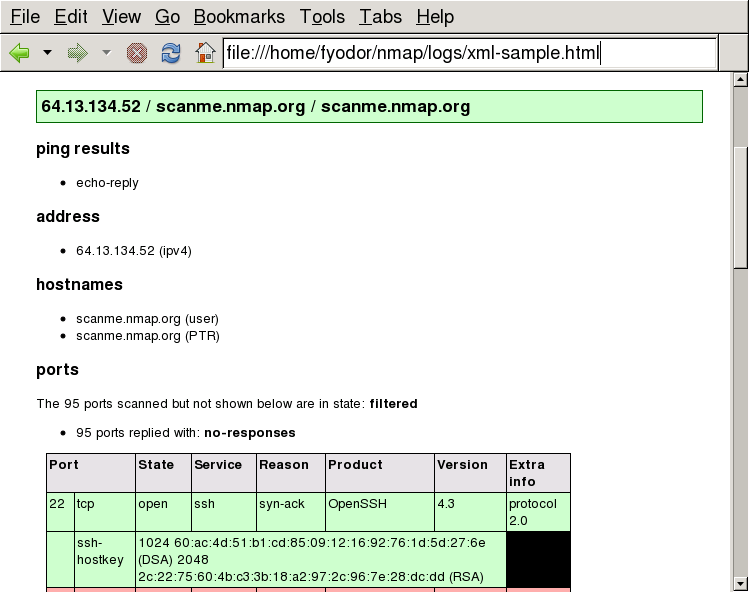
Here are commands that turn an Nmap XML output file into an HTML file using common XSLT processors. Sample output viewed in a web browser is shown in Figure 13.1, “HTML from XML output in a web browser”.
- xsltproc
xsltproc
<nmap-output.xml>-o<nmap-output.html>- Saxon
Saxon 9: java -jar saxon9.jar -s:
<nmap-output.xml>-o:<nmap-output.html>Previous Saxon releases: java -jar saxon.jar -a
<nmap-output.xml>-o<nmap-output.html>- Xalan
Using Xalan C++: Xalan -a
<nmap-output.xml>-o<nmap-output.html>Using Xalan Java: java -jar xalan.jar -IN
<nmap-output.xml>-OUT<nmap-output.html>
These programs automatically know where to load the stylesheet thanks to the embedded stylesheet reference. As a historical note, the stylesheet was originally intended to render the XML output as HTML by simply opening the XML file in a web browser. For a while it worked that way. But web browsers are implementing more and more severe same-origin restrictions that prevent XML files from loading except from narrowly limited locations. For example, Gecko, the rendering engine used by Mozilla, requires that the stylesheet be located in the same directory as or in a subdirectory of the XML file.